04When work takes a while

Work in the background.
Steer it while it runs.

Subagents and long shell commands keep running while the main agent moves on, and their reports wake it when they finish. The input stays open the whole time, so you can queue the next task, guide the current run, or open any subagent and steer it.
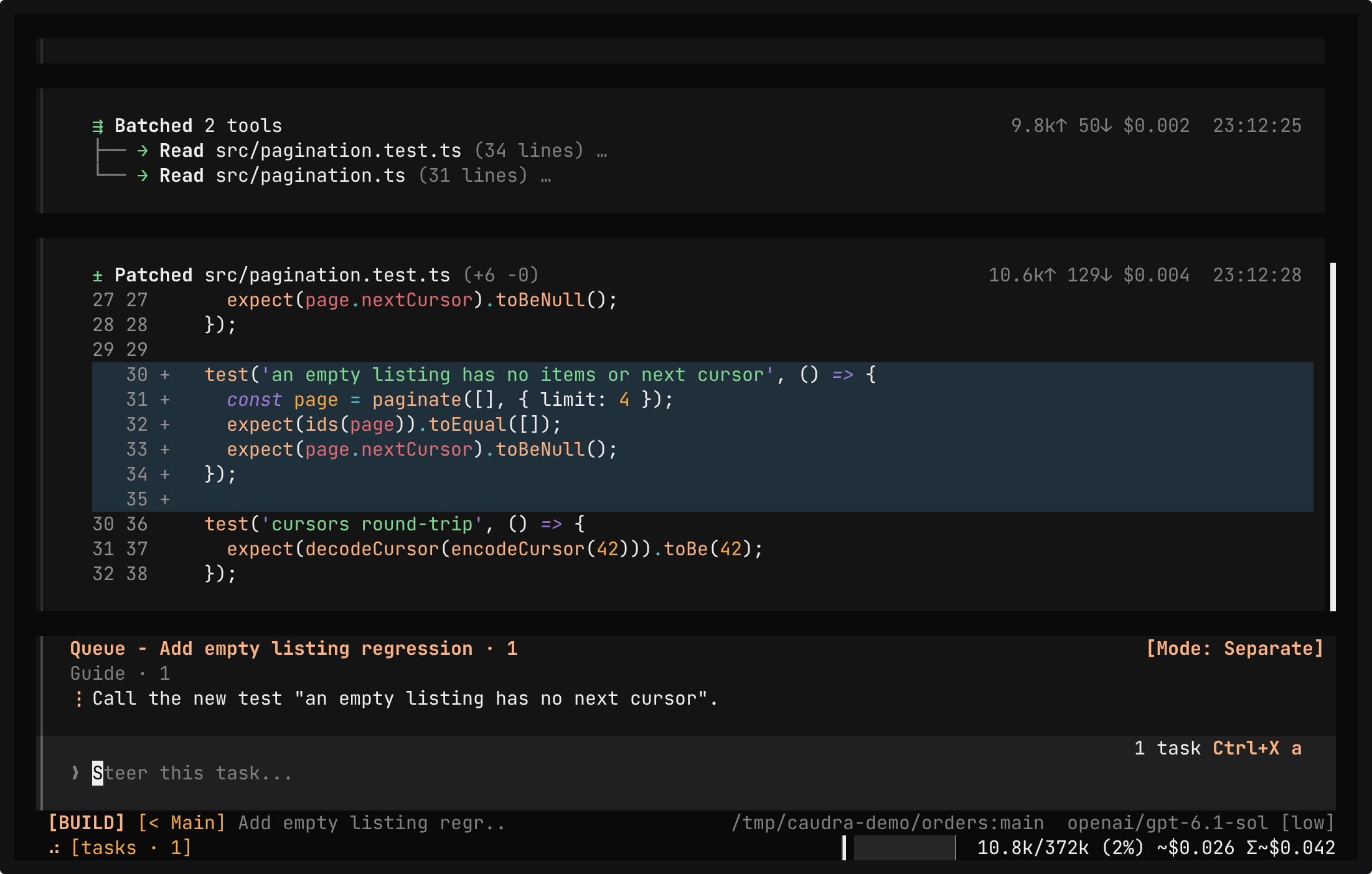
The chat of a running subagent. It has patched src/pagination.test.ts with a test named "an empty listing has no items or next cursor" and starts its report. Below it, your guidance, Call the new test "returns no cursor for an empty listing", waits in the queue of the task until the subagent reads it.

Terminal recording · Guide a running subagentA real session in the demo project, whose AGENTS.md asks for background tasks and one final make check. You guide the running subagent from its own chat, add guidance to the main run, and queue make check for after the run. The subagent renames its test as guided. The main run ends with its own make check, and the queued prompt then runs make check a second time. Both pass 8 tests.Open in the gallery
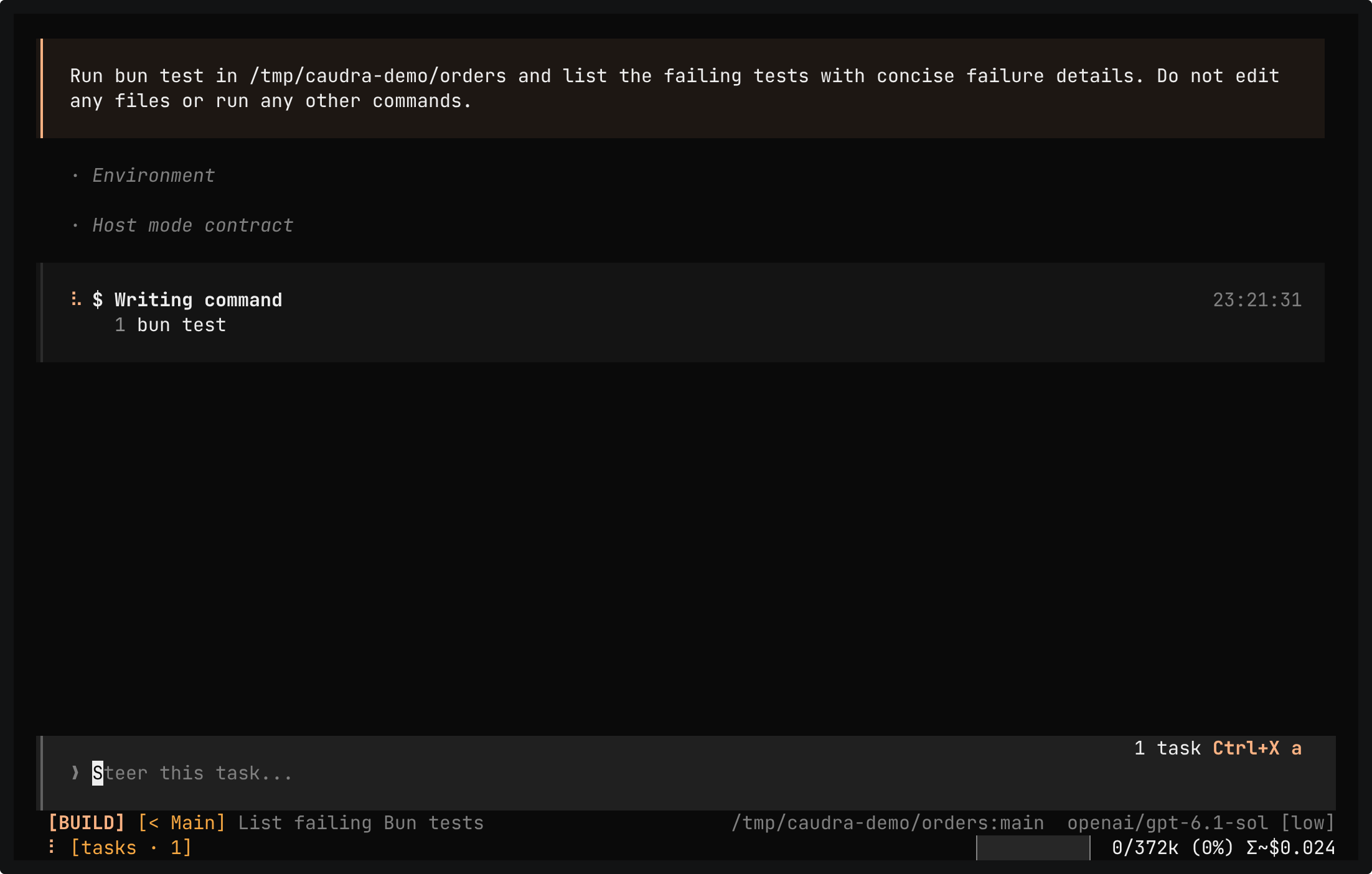
The chat of the task List failing Bun tests. Its brief reads In /tmp/caudra-demo/orders run bun test and list the failing tests with concise failure details and exit status. Do not edit any files. Run no other commands. Below it, the subagent is writing its first command, bun test.

Terminal recording · Work starts while the model writesA real session in the demo project. One reply asks for a grep, a read, and a background task. The grep and the read finish while the model is still writing the task brief, and the task chat opens before the brief is complete. The subagent runs bun test and reports the three failing tests.Open in the gallery
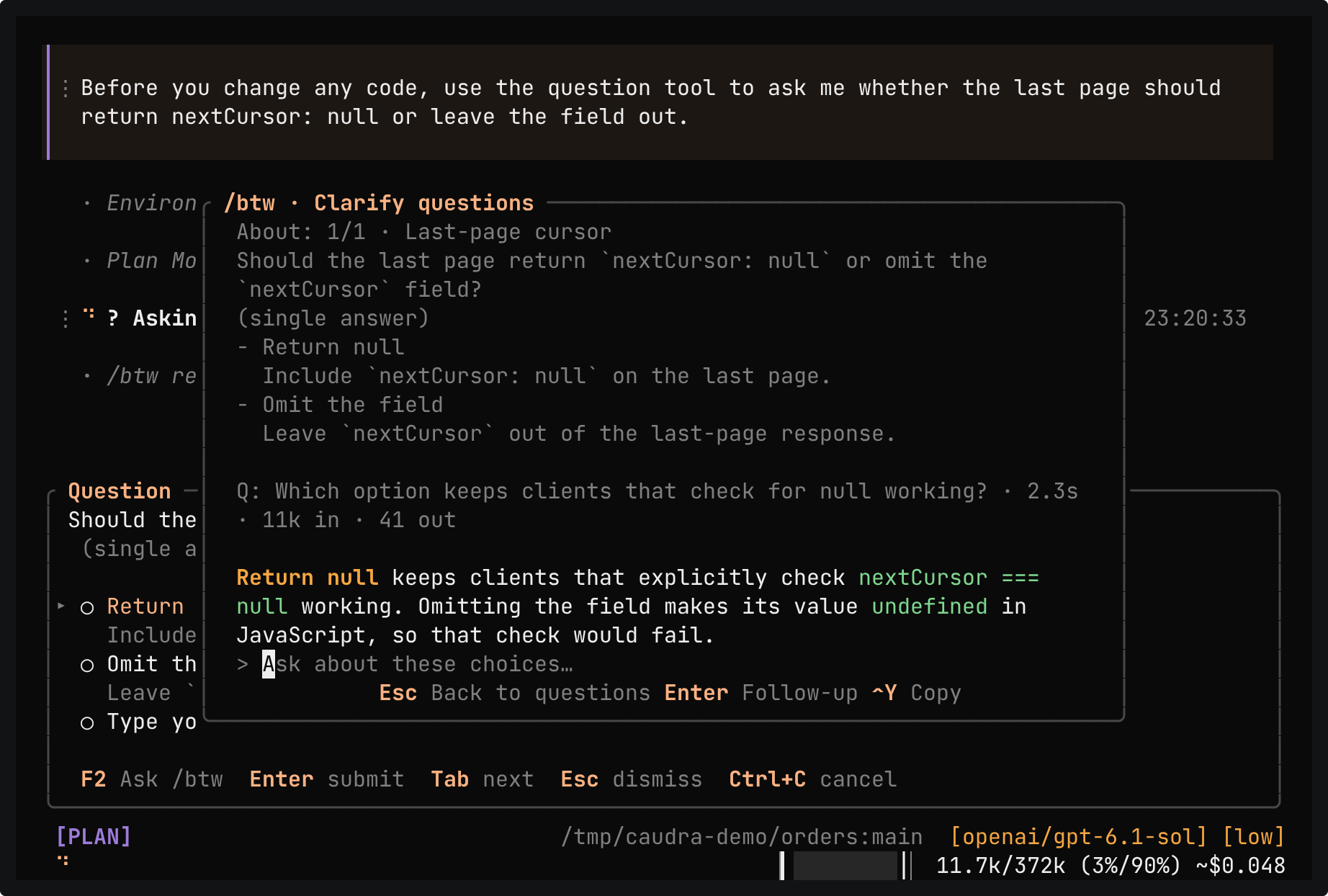
The /btw panel over the question form. It repeats the question and both choices, then the side question, Which option keeps clients that check for null working?, and its answer: Return null keeps clients that explicitly check nextCursor === null working. Omitting the field makes its value undefined in JavaScript, so that strict null check would fail.

Terminal recording · Clarify a question with /btwA real session in the demo project. The agent asks whether the last page should return nextCursor: null or leave the field out. F2 opens /btw, which answers a side question about the choices. Esc returns to the unchanged form, and you pick Return null.Open in the gallery
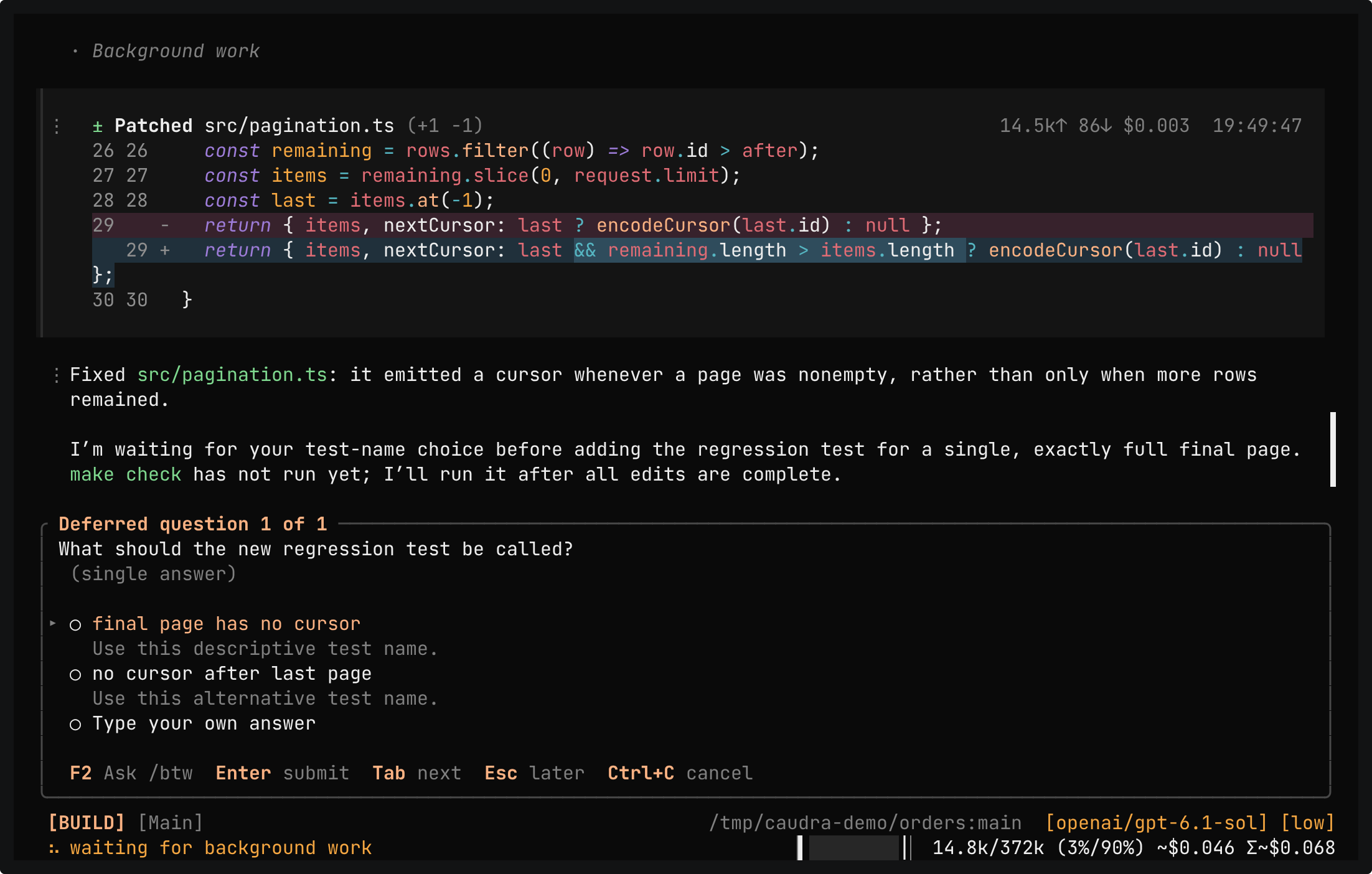
The git diff of src/pagination.ts, where line 29 now returns a cursor only when more rows remain, and the agent saying that it waits for the test name before it adds the regression test and runs make check. Below, the docked form Deferred question 1 of 1 asks what the new regression test should be called, offers two names, and holds the typed answer returns no cursor for an empty listing.

Terminal recording · Answer a question laterA real session in the demo project. The prompt asks for the final-page cursor fix and a regression test, and asks the agent to ask for the test name in the background. The form docks as Deferred question 1 of 1, and Esc parks it in the status bar as [? 1]. The agent keeps working and patches src/pagination.ts. The form docks again, and the agent ends its turn to wait for the name. The typed answer becomes the name of a new test, and make check passes 8 tests.Open in the gallery
  • Subagents in the background

    A task can run in the background while the main agent works on a separate part. Its report starts the next step at a safe boundary, with no polling.

  • Shell calls in the background

    A shell command waits up to 10 minutes. A command still running then moves to the background without a restart, and the agent gets the output so far. The model can also start a server or a long build in the background at once. /shells lists each command with an ETA learned on your machine.

  • A check on long waits

    Every 30 minutes a background shell runs, Caudra shows the agent waiting on it the latest output and asks whether to keep waiting. A command stuck on a prompt or a lock does not hold the agent until its deadline.

  • Guide a subagent directly

    Open a running subagent from /tasks and type. Your guidance stays visible until the subagent reads it at its next turn boundary. When the subagent is heading the wrong way, Ctrl+X x replaces its current turn with your message.

  • The main agent guides its tasks

    The main agent can send a running task changed requirements or a reply to its report, and the task reads it at its next step. It can also replace the task's current turn. Guidance the task never read comes back with its result.

  • Switch models while work runs

    /model and /thinking act on the chat on screen, including a running or finished task. The request in flight finishes first. A request that waits for a retry, a rate limit, or a spent account goes out at once on the new model.

  • Next, Guide, and Replace

    Enter queues a prompt for after the current run. Ctrl+X g adds guidance before the next model request, and Ctrl+X x stops the run and starts yours. Queued prompts stay editable.

  • Watch every step

    A subagent's chat opens while the model is still writing its instructions, so you can read the task before it starts. Its card in the main chat then lists each step it takes, down to the calls its Python snippets make.

  • Questions you can answer later

    The agent can ask a question in the background and keep working. Ctrl+X u opens it again when you are ready, and your answer reaches the agent between tool rounds.

  • Ask /btw on the side

    F2 opens a side question about the chat on screen, a task's chat included, without adding to its history. The answer can read and search files, run read-only commands, and search the web, and Caudra refuses any call that would change something. When the agent asks you a question, F2 clarifies the choices, and Esc returns to the unchanged form.

  • Catch up with /catchup

    After time away, /catchup asks a side question that opens with the goal and where things stand, then lists what needs you, what the agent is doing, and what is done, decided, and still open.

Background work needs a running session. Closing it stops the work, and when you reopen the session, the main turn and its subagents resume. Shell commands are not run again.

Background tasks